Results you can act on.
Areas for review
The answers that point to a gap, grouped so you can see where to look first.
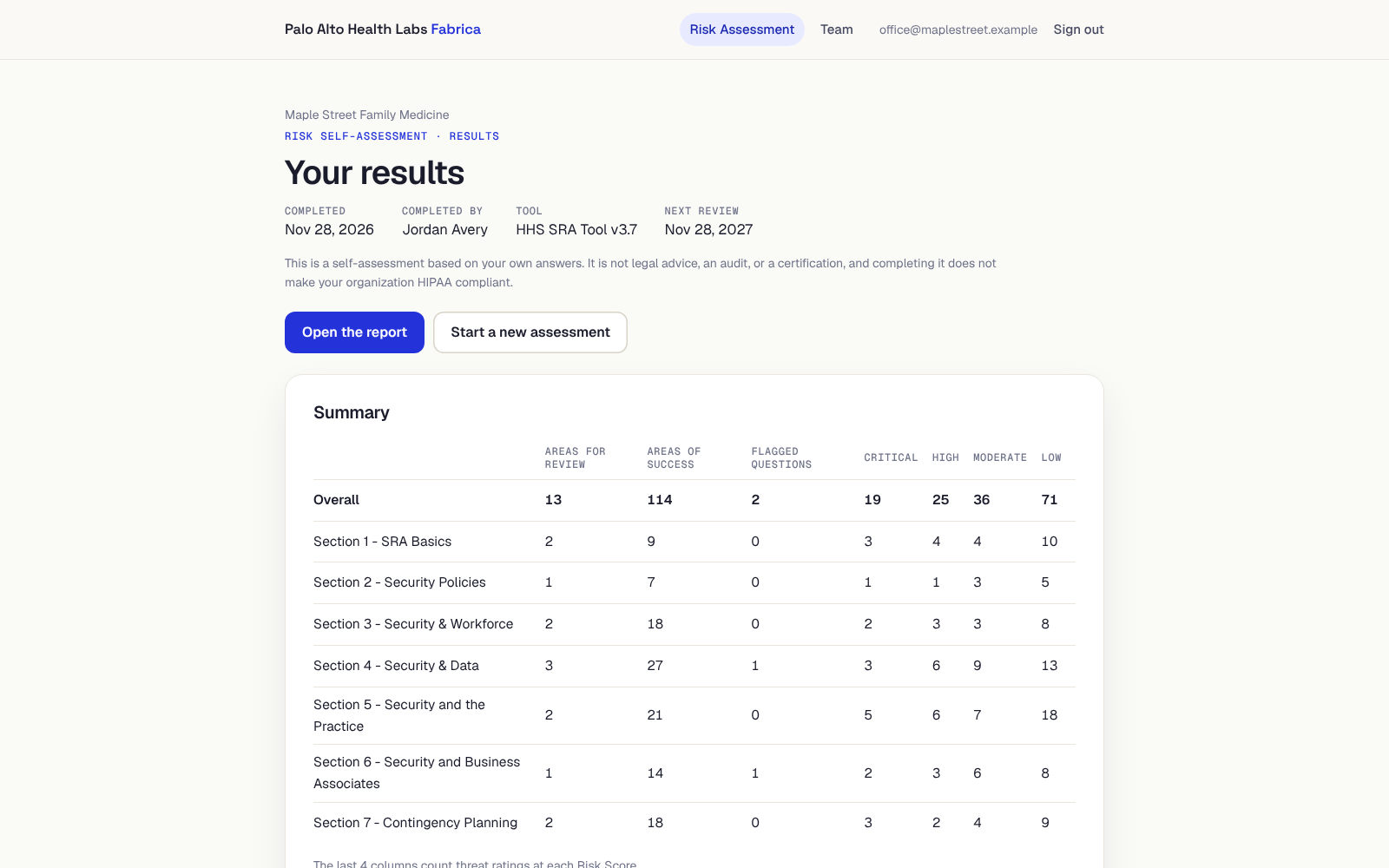
A risk register with scores
Each risk with its likelihood and impact, scored the way the HHS tool scores it.
A worklist with owners and dates
One line per item: who is handling it, and by when.
A printable report
A dated record of the assessment to keep with your HIPAA documentation.
Three steps.
- 01
Sign up with your email.
Nothing to install. Invite a colleague if someone else knows the IT side.
- 02
Answer questions about your systems.
Each question comes with the government's own explanation and references. Stop when you need to; your progress is saved.
- 03
Get your results.
Areas for review, risk scores, a worklist and a report, in one dashboard.
The seven sections of the HHS tool.
All 127 questions, every response option, the education text, the references and the risk scoring are reproduced without change from the v3.7 Excel workbook of the HHS Security Risk Assessment Tool.
- SRA BasicsYour security management process
- Security PoliciesWhat is written down
- Security & WorkforceAccess to systems, and training
- Security & DataTechnical safeguards
- Security and the PracticePhysical safeguards
- Security and Business AssociatesBusiness associate agreements and vendor access
- Contingency PlanningBackups and recovery
We add a short, clearly labeled set of our own questions about the systems you use and any apps your practice built with AI tools. Palo Alto Health Labs is not affiliated with or endorsed by HHS. New to the topic? Read our guide to the HIPAA security risk assessment.
Built an app with AI?
The assessment asks about apps built with tools like Base44, Lovable or ChatGPT, often called vibe-coded apps, and shows what changes if they hold patient information. Findings that Fabrica would handle are marked in your results.
Self-assessment, or an expert Risk Analysis.
| Compare | Risk Self-Assessment | Expert Risk Analysis |
|---|---|---|
| What it is | You answer the HHS question set online and see your results right away. | A written Risk Analysis for your practice, prepared by Michael Hittle, MS, PhD. |
| Who does the work | You and your team. | We do, from your answers and a review call with you. |
| What you get | Areas for review, a risk register with scores, a worklist and a printable report. | Everything in the self-assessment, plus an expert's written analysis of your risks and what to do about them. |
| Cost | Free. | $3,000. Request it at any point in the app, including before you start. |
Built by Michael Hittle, MS, PhD, founder of Palo Alto Health Labs. He holds a Stanford PhD in epidemiology and clinical research with a digital health focus, co-founded CardinalKit and was co-architect of Stanford Medicine's mHealth Platform 2.0. More about Mike. The Risk Self-Assessment is part of Fabrica, our HIPAA-ready foundation for healthcare apps.
Frequently asked questions
Is a HIPAA risk assessment required?
Yes, if HIPAA applies to you. The Security Rule requires covered entities and business associates to conduct an accurate and thorough assessment of the risks to the electronic patient information they hold (45 CFR 164.308(a)(1)(ii)(A)). The rule calls it a risk analysis. People also say risk assessment.
How often do we need to do one?
The rule sets no fixed interval. It asks you to review your documentation periodically and update it when your systems or operations change (45 CFR 164.316(b)(2)(iii)). Many practices choose once a year and after any big change, such as a new EHR or a new vendor.
Who can do a risk assessment?
The rule does not say who must do the work, and it does not require an outside firm. Many small practices do it themselves, led by the security official the rule asks every practice to name (45 CFR 164.308(a)(2)). The practice stays responsible for the result either way.
Is this the same as the HHS tool?
The content is the same. The questions, response options, education text, references and risk scoring are reproduced without change from the Excel workbook of the HHS Security Risk Assessment Tool, version 3.7. What we add is the delivery: no install, saved progress, a team login and results in a dashboard. Palo Alto Health Labs is not affiliated with or endorsed by HHS.
How long does it take?
It depends on your practice. The full question set is 127 questions, plus threat ratings for the vulnerabilities that apply to you. Plan for more than one sitting. Your progress is saved, and a colleague can log in to answer the parts they know best.
Are we HIPAA compliant once we finish it?
No. The government says the same of its own tool: using it is neither required by nor guarantees compliance (HealthIT.gov). A risk assessment is one requirement among several, and it only counts if you act on what it finds. The worklist is there to help you do that.
Do you see our answers?
Your answers are saved to your account so you and your team can come back to them. Palo Alto Health Labs staff can view answers in order to provide the service, and we may contact you about your results. Any statistics we publish are aggregated and cannot identify a practice. You can ask us to delete your account and answers at any time.
Do I enter patient information?
No. The questions are about your systems, policies and vendors. Nothing asks for a patient's name, record or any other patient information, and you should not type any in.
What does the expert Risk Analysis include?
A written Risk Analysis for your practice, prepared by Michael Hittle, MS, PhD, from your answers and a review call with you. It costs $3,000, and you can request it at any point in the app, including before you start the self-assessment. It is expert-prepared. It is not a certification, and your practice remains responsible for its own compliance.
Does HIPAA apply to a cash-only practice?
It depends on what the practice sends electronically, not on how patients pay. A provider is covered if it transmits health information electronically in connection with standard transactions such as insurance claims or eligibility checks (45 CFR 160.103; CMS: Are You a Covered Entity?). A practice that never does may fall outside HIPAA, though state privacy laws can still apply. Ask your attorney if you are unsure.
Start your risk assessment.
Free, online, and saved as you go. No patient information needed.
Start your risk assessmentThe self-assessment is based on your own answers and is not legal advice. Last reviewed November 28, 2026 by Michael Hittle, MS, PhD.